



Key Highlights
- Bitwise and Lombard have formed a strategic alliance enabling institutions to generate yield and access borrowing against Bitcoin holdings while maintaining custodial control
- The platform introduces “Bitcoin Smart Accounts” that bridge institutional custody systems with blockchain-based financial services
- Morpho, a decentralized protocol for lending, will power the borrowing functionality
- Approximately $500 billion in Bitcoin remains in institutional custody with minimal participation in DeFi, according to Lombard’s analysis
- The platform targets a Q2 2026 launch date, with plans to integrate additional custodians and protocols afterward
Lombard, a company specializing in Bitcoin lending infrastructure, has formed a strategic partnership with Bitwise Asset Management. The collaboration aims to enable institutions to activate their Bitcoin holdings while preserving existing custody arrangements.
The announcement came during the Digital Asset Summit in New York. The platform addresses the needs of asset managers, corporate treasuries, and high-net-worth clients holding substantial Bitcoin positions with limited return-generating opportunities.
Jacob Phillips, CEO of Lombard, highlighted the core innovation as “Bitcoin Smart Accounts.” This technology bridges institutional custody infrastructure with blockchain-based finance, two ecosystems that have traditionally remained disconnected.
Bitwise will develop yield-generating strategies that merge decentralized finance lending protocols with tokenized real-world assets. Morpho, a decentralized lending platform, will provide the technical foundation for borrowing capabilities against Bitcoin collateral.
The system leverages Bitcoin-native technologies, including partially signed transactions and timelocks, to authenticate collateral positions. This approach enables onchain representation of positions while the underlying Bitcoin remains in its original location.
Phillips explained that the architecture simultaneously eliminates three major risk categories: custody risk, bridge risk, and counterparty risk. These factors have historically created barriers for institutional Bitcoin lending adoption.
Lombard’s research indicates approximately $500 billion in Bitcoin currently resides in institutional custody arrangements. The majority of these holdings remain disconnected from onchain financial markets and generate zero yield.
Bitcoin’s Expanding DeFi Presence
Bitcoin’s total value locked within DeFi protocols stands at approximately $2.93 billion, based on DefiLlama tracking data. While representing a modest percentage of Bitcoin’s roughly $1.4 trillion market capitalization, this figure continues its upward trajectory.
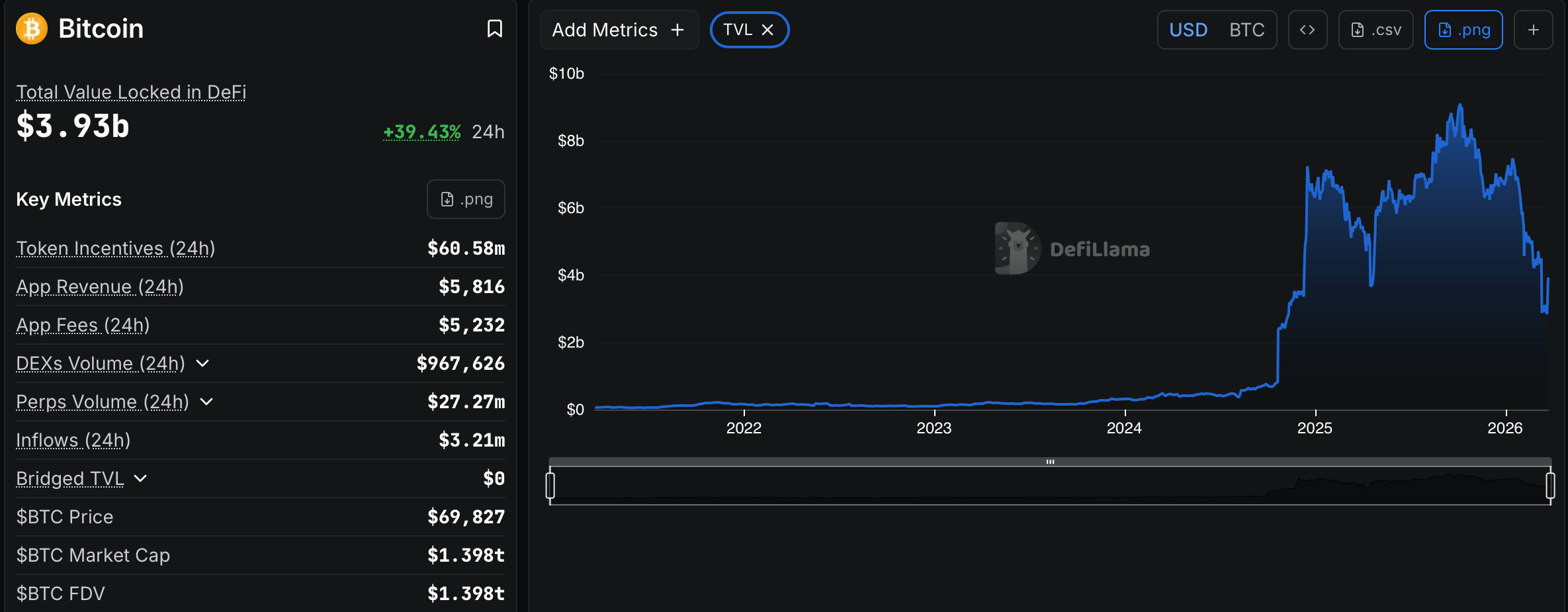
Babylon Protocol dominates Bitcoin-focused DeFi with approximately $2.8 billion in total value locked. Lombard holds the second position with roughly $744 million.
Additional market developments include Telegram’s February integration of yield-generating vaults within its cryptocurrency wallet, supporting Bitcoin, Ether, and USDT. March saw Bitcoin staking protocol Babylon partner with hardware wallet manufacturer Ledger, enabling users to generate yield while maintaining self-custody through hardware-secured transaction signing.
Bitwise previously collaborated with Morpho in January to introduce non-custodial vaults designed for yield generation via overcollateralized lending mechanisms.
Institutional Investor Benefits
Historically, institutions have faced constrained options. Generating yield or accessing liquidity from Bitcoin holdings typically required exiting custody arrangements, accepting counterparty exposure, or triggering taxable events.
The Lombard-Bitwise platform addresses these challenges simultaneously. Bitcoin remains within its established custody framework, eliminating the need for institutions to modify asset holding structures.
Phillips characterized the transition as transforming Bitcoin from passive value storage into productive capital deployment. The Q2 2026 rollout timeline includes Lombard’s commitment to expanding custodian partnerships and protocol integrations following the initial launch.
