



Key Highlights
- Order intake for Q1 reached €269.7 million, representing a 104.5% year-over-year increase and exceeding analyst expectations by approximately 4%
- Revenue climbed 28.3% to €184.9 million while net profit surged 63.8% to €51.6 million
- Growth fueled by advanced hybrid bonding technology and equipment used in AI chip assembly
- Management forecasts sequential revenue expansion of 30% to 40% for Q2, with gross margins projected between 64% and 66%
- An additional customer initiated qualification processes for high bandwidth memory (HBM) hybrid bonding solutions
BE Semiconductor Industries delivered impressive first-quarter performance, with order intake more than doubling while profit expanded by nearly 64%, reflecting the ongoing surge in AI-related demand for sophisticated chip packaging solutions.
The Netherlands-based equipment manufacturer recorded order bookings totaling €269.7 million during Q1 2026, representing a 104.5% climb from the €131.9 million registered in the same period last year. This performance exceeded analyst projections by approximately 4%, according to data from J.P. Morgan.
Quarterly revenue reached €184.9 million, marking a 28.3% year-over-year advance. Net profit landed at €51.6 million, compared to €31.5 million in Q1 2025, supported by revenue expansion and ongoing efficiency initiatives.
The company’s accumulated order backlog more than doubled during the quarter, reaching €268.7 million. Leadership pointed to robust shipment activity across premium mobile devices and 2.5D AI computing platforms.
Advanced Bonding Technology Shows Strong Momentum
Hybrid bonding — an innovative packaging technique that enables direct chip-to-chip vertical integration — continues to serve as a central growth catalyst for Besi. Industry experts view this technology as essential for powering the next wave of AI processors and high bandwidth memory solutions.
During the quarter, a second major customer initiated qualification work on Besi’s hybrid bonding capabilities for high bandwidth memory applications. Market analysts view this development as a favorable indicator of expanding HBM technology adoption.
J.P. Morgan characterized the quarterly results as evidence that hybrid bonding implementation is accelerating within the memory sector, describing the announcement as “a positive print” from the equipment maker.
Besi’s early leadership position in hybrid bonding technology has positioned the company to capture substantial benefits from the expanding AI chip infrastructure. Major customers include semiconductor leaders TSMC, Intel, and Samsung Electronics — all currently expanding manufacturing capabilities.
Both TSMC and Samsung recently outlined intentions to boost production capacity further, a trend expected to generate additional equipment demand for Besi in coming quarters.
Second Quarter Outlook Shows Continued Strength
For the upcoming quarter, Besi projected sequential revenue growth ranging from 30% to 40%, building from the Q1 baseline of €184.9 million. This guidance translates to expected Q2 revenue between approximately €240 million and €259 million.
Gross margin performance is anticipated to expand to a range of 64% to 66% in Q2. Net income is forecast to show substantial improvement.
The forward-looking guidance underscores sustained momentum in AI-driven demand, despite softer conditions across other semiconductor market segments including automotive, personal computing, and consumer memory applications.
Among European chip sector peers, STMicroelectronics similarly delivered first-quarter results surpassing analyst estimates, suggesting emerging recovery signals across key market verticals.
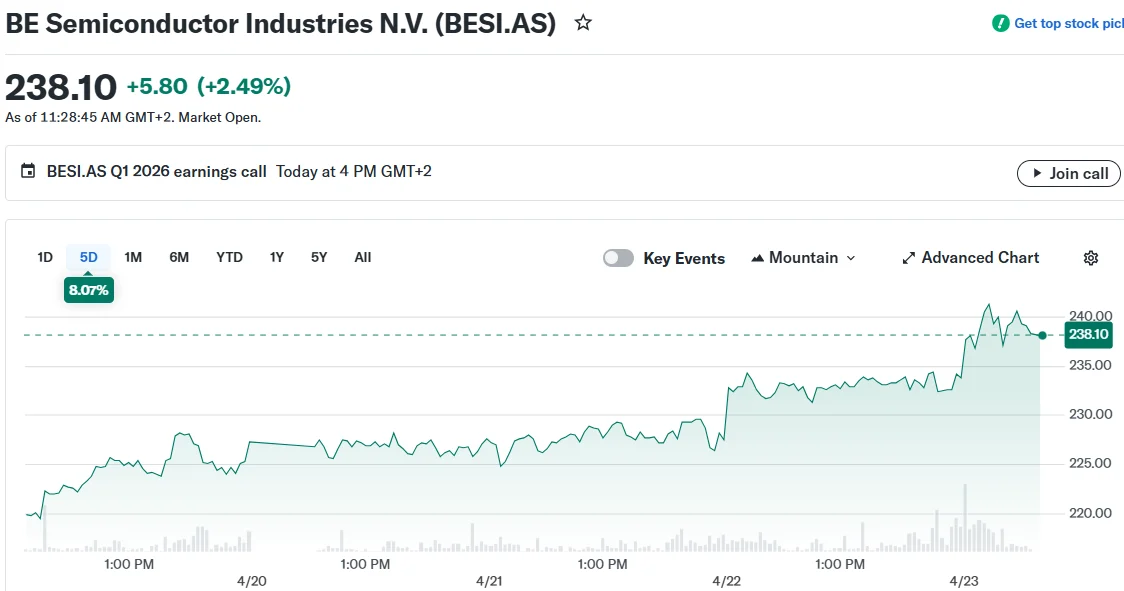
BESI shares advanced approximately 3% during early Thursday trading in Amsterdam, outpacing the broader Dutch AEX index. The stock has accumulated gains of roughly 79% year-to-date through Thursday’s trading session.
