


Key Takeaways
- An attacker exploited the KelpDAO-LayerZero bridge to create 116,500 unbacked rsETH tokens, extracting approximately $292 million
- Using fraudulent collateral, the hacker withdrew around $190M in ETH from Aave, creating a deficit exceeding 112,000 rsETH
- Aave experienced roughly $9 billion in net withdrawals; DeFi’s total value locked declined by approximately $13 billion in two days
- Industry leaders launched “DeFi United,” with contributions pledged by Lido, EtherFi, and Aave’s founder to stabilize the protocol
- A portion of the exploited assets moved to Bitcoin through Thorchain, complicating complete fund recovery
On April 18, 2026, an exploiter targeted a security flaw in the KelpDAO-LayerZero bridge connection, creating 116,500 rsETH tokens without any underlying assets to support them.
Instead of immediately liquidating these fabricated tokens, the exploiter deposited approximately 90,000 of them into Aave to serve as collateral. Using this position, they withdrew roughly $190 million in ETH and various digital assets from both Ethereum and Arbitrum networks.
Aave found itself holding collateral with zero actual value. Market participants quickly recognized the situation and initiated rapid fund withdrawals, creating conditions similar to a traditional bank run.
The platform’s total value locked plummeted by approximately $10 billion in the hours following the discovery. By April 21, net withdrawals had reached about $9 billion, with TVL declining from more than $17.5 billion down to approximately $14.3 billion.
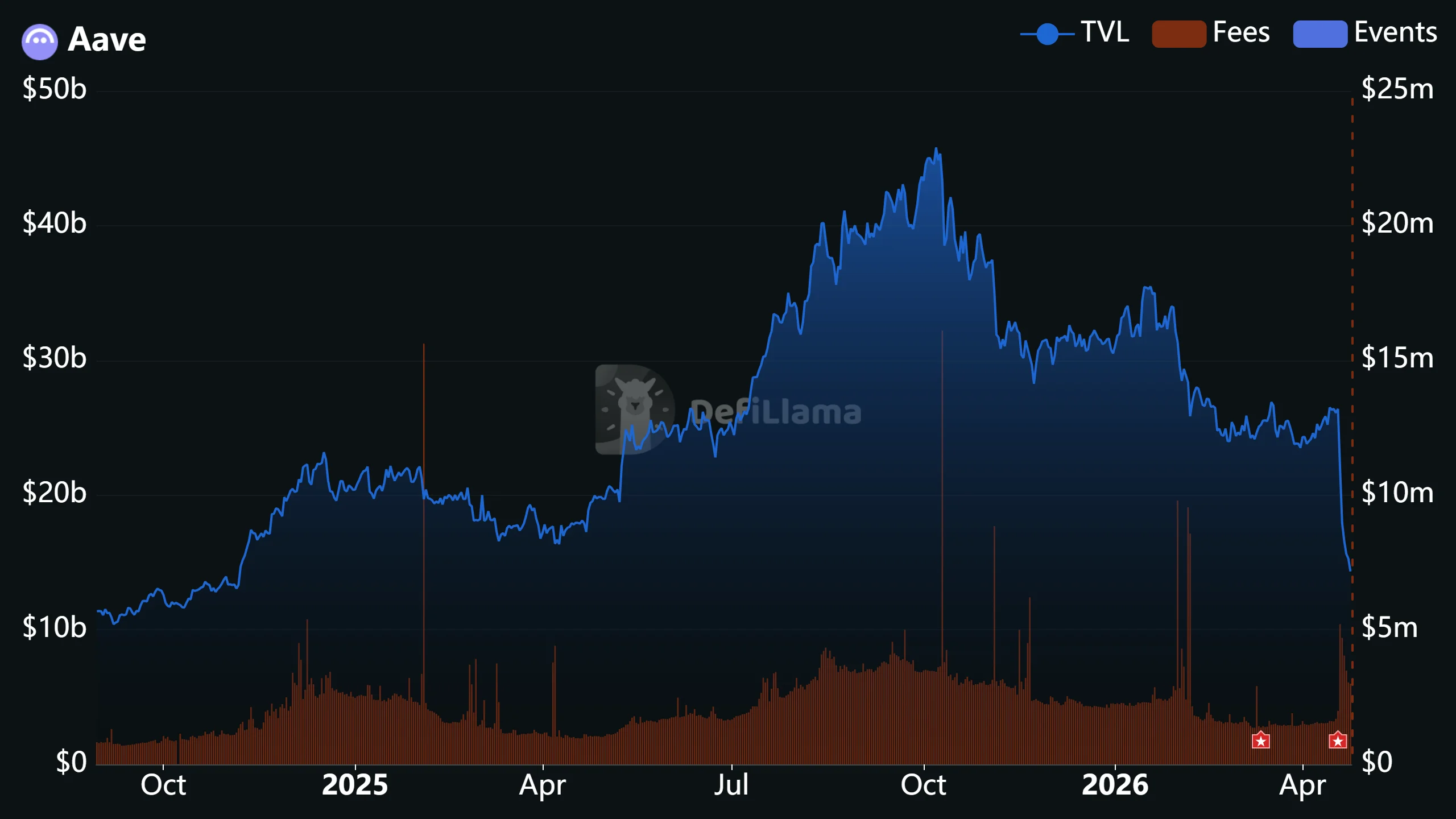
The impact extended throughout decentralized finance. Total value locked across all DeFi lending platforms decreased by roughly $13 billion in the 48-hour period after the exploit became widely known.
Arbitrum’s security council responded swiftly by freezing 30,766 ETH — valued at approximately $71 million — connected to the exploit. Meanwhile, substantial portions of the stolen assets were converted to Bitcoin via Thorchain, substantially reducing the likelihood of full fund recovery.
Industry Mobilizes with DeFi United Initiative
Aave along with its affiliated service providers initiated a collaborative response named “DeFi United,” aimed at restoring rsETH backing and containing bad debt from proliferating throughout lending ecosystems.
Lido Finance emerged as the first major participant. The Lido Labs Foundation put forward a proposal to allocate up to 2,500 stETH, representing approximately $5.7–$6 million, into a specialized recovery fund. These resources would be released only when total contributions reach levels sufficient to address the complete deficit.
EtherFi subsequently announced plans to contribute 5,000 ETH toward user protection and bad debt prevention. Aave founder Stani Kulechov made a personal commitment of 5,000 ETH as well.
“Aave is my life’s work and we’re working nonstop to find the best possible outcome for users,” Kulechov posted on X.
Lido’s participation carries strategic motivation. The organization operates an EarnETH vault with direct rsETH exposure, where failure to implement a coordinated solution could result in losses approaching 9,000 ETH for vault participants.
Protocol Suspends rsETH Operations on Multiple Networks
Aave took defensive measures by suspending rsETH reserves on Ethereum Core, Arbitrum, Base, Mantle, and Linea networks while recovery strategies continue to develop.
The complete deficit stands at more than 112,000 rsETH based on Aave’s official incident documentation. The DeFi United initiative concentrates on system stabilization through new capital infusions rather than pursuing recovery of the exploited funds themselves.
Aave indicated that additional contribution pledges will be disclosed as they receive official confirmation.
