



Dotted lines are known to appear in Excel from time to time due to a number of causes.
For example, they can appear when dotted borders are placed around the cells or when the spreadsheet is indicating that there is a page break.
Lines can also be the result of having parts of the spreadsheet being set as ‘Print Areas’ or the sheet being put into print view.
Dotted lines can appear when border settings have been changed to show as dotted or they could simply even be gridlines that only appear to be dotted lines.
Whatever the cause, dotted lines can be distracting, making it necessary to find a way to fix or remove them.
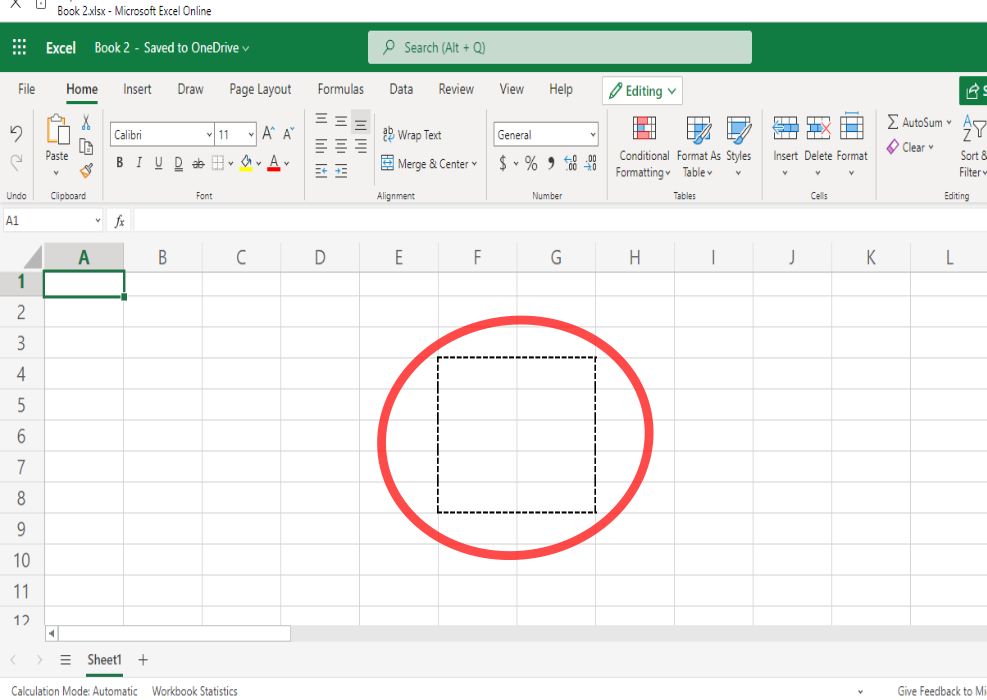
How to Remove Dotted Lines from Excel
There are many ways that you can go about removing dotted lines in Excel.
Start by figuring out which issue is causing the dotted lines to appear.
Then, continue by working through the steps necessary to resolve the problem.
This tutorial provides effective solutions that can be used to remove unwanted dotted lines in Excel.
Change the Print Area Option
The print area of a spreadsheet is a specific cell or set of cells that can be printed if you don’t wish to print out the whole sheet.
When the appearance of lines happens as a result of the Print settings, this can sometimes cause gray lines which are not dotted – although they may appear to be.
Changing the Print Area option can be the perfect solution to resolve the appearance of lines in your worksheet.
- Click and select the cell range which have dotted lines.
- In the ribbon menu, select ‘Page Layout’.
- In the ‘Page Setup’ area, select ‘Print Area’. Upon clicking ‘Print Area’ a menu should appear.
- Click on ‘Clear Print Area’ in this menu.

After clearing the print area, the lines should then be removed from where they were before.
Visual Basic Method
The Visual Basic Method involves using some code, in addition to an editor.
VBA Editor is a useful tool that allows you to use and run VBA code in Excel.
This method will employ the VBA Editor to stop Excel from displaying page breaks.
While this method may seem a bit more involved than other methods, it can be effective in removing dotted lines from Excel.
- Copy this piece of code: ActiveSheet.DisplayPageBreaks = False
- Hold down Alt + F11 until the VBA Editor opens.
- Paste the code from step 1 into the Immediate window by right-clicking and selecting ‘Paste’ or holding down CTRL+ V.
- Press Enter on the keyboard.
- Go back to the original Excel worksheet that you started from.

When you’ve completed the last step of the Visual Basic method, the dotted lines should disappear.
Uncheck Show Page Breaks Technique
Changing the settings of the page breaks in Excel can be a great way to get rid of unwanted lines.
To make things even better, unselecting the option to show page breaks in Excel isn’t complicated nor does it take up much time.
- In the ribbon menu at the top of the page, click on ‘File’.
- Next, select ‘Options’.
- When the dialog box that shows ‘Excel Options’ comes up, select ‘Advanced’.
- Under ‘Display options for this worksheet’, remove the check from “Show page breaks”.
Alternate page breaks technique: You can also go to ‘Page Layout’ in the ribbon menu, click on “Breaks”, then click on ‘Remove Page Break’ to select it.

Unchecking the “Show page breaks” option should then remove the dotted lines from your worksheet.
Changing the Border Around Cells
Sometimes dotted lines appear due to the border settings being set to have a dotted style.
If the problem of dotted lines stems from the borders of the cells being set to dotted, then this method would be appropriate.
Changing the setting for cell border style can help to resolve this problem and this can be a super simple means of removing dotted lines quickly and effectively.
- Click and select the range of cells that you want the dotted borders gone from.
- Select and click on ‘Home’ in the ribbon menu.
- Click the ‘Border’ arrow to open up the border drop-down menu.
- Select ‘No Border’ in the drop-down menu. There will be more options available for border styles in this menu if you wish to change the border.

Once you have made changes to the border settings and have removed the border from the cells, you should see that the dotted lines have disappeared.
Use the Open and Close Technique
The open and close technique may not be the best approach to fixing this problem, yet it can be a super simple and quick way to get rid of dotted lines in Excel.
This technique employs the convenient method of closing and opening the document to make dotted lines go away – making it one of the easiest methods around.
To do this method:
- Make sure to save any work before closing.
- Click the Close Window option in the top right of the spreadsheet window. You could also click ‘File’ in the ribbon menu, then click ‘Close’.
- Next, reopen the workbook by opening Excel, clicking on ‘File’, then pressing ‘Open’ or holding down on CTRL + O.
- Choose the location or name of the file you’re reopening, then select it by clicking on it.
- Click ‘Open’ to reopen the workbook.
After closing the workbook then opening it back up again, the dotted lines should be gone from the sheet.
Removing Dotted Lines from Excel Can be Easy
Finding an answer to removing dotted lines in Excel can be a matter of completing a few, short and easy steps.
If one approach doesn’t solve the problem, move onto a different one until the dotted lines are gone.
As a result, these simple tips can provide you with the solution that you have been looking for.
