



Key Takeaways
- Brent crude surged more than 4% toward $106 per barrel following Trump’s dismissal of Iran’s peace terms
- Trump described Iran’s proposal as “TOTALLY UNACCEPTABLE,” extending the Strait of Hormuz blockade
- Tehran proposed moving enriched uranium to another nation while maintaining nuclear infrastructure
- Saudi Aramco’s CEO reports weekly losses of 100 million barrels from the oil market
- Upcoming Trump-Xi Jinping summit this week will likely address the Iran situation
Global oil markets experienced significant upward momentum Monday following President Donald Trump’s dismissal of Iran’s counterproposal to U.S. peace terms, with Brent crude approaching $106 per barrel.
Through social media channels, Trump declared Tehran’s response “TOTALLY UNACCEPTABLE,” eliminating expectations of an imminent agreement. The conflict between the two nations has now stretched across approximately 10 weeks.
Brent crude futures climbed as high as 4.6% toward $106 per barrel during trading before moderating slightly. West Texas Intermediate reached levels near $98 per barrel.
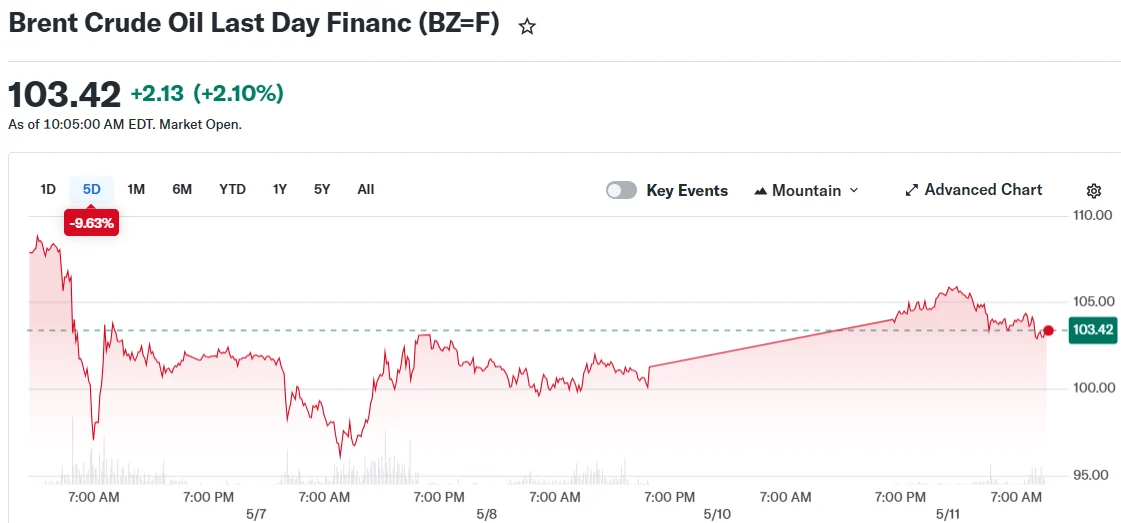
These gains reversed previous week’s losses, when both benchmark contracts fell over 6% amid optimism that Washington and Tehran were approaching a temporary framework to restore Gulf shipping operations.
The U.S. proposal allegedly demanded Iran cease uranium enrichment activities for two decades, eliminate existing enriched uranium reserves, and disassemble critical nuclear infrastructure, offering sanctions relief and military de-escalation in return.
Tehran’s counterproposal, delivered via Pakistani intermediaries, requested complete sanctions removal, withdrawal of U.S. naval forces from the Strait of Hormuz vicinity, and acknowledgment of Iran’s rights to pursue certain nuclear programs.
According to Wall Street Journal reporting, Iran proposed diluting portions of its highly enriched uranium while relocating remaining stockpiles to a third nation. Tehran contested aspects of this coverage.
Economic Impact of the Strait Closure
The Strait of Hormuz facilitates approximately one-fifth of global oil transport. The waterway has remained substantially blocked throughout the conflict, halting crude, gas, and refined product deliveries to international markets.
Saudi Aramco’s CEO Amin Nasser stated the oil market experiences losses of 100 million barrels weekly. He cautioned that disruptions extending into June could delay market normalization until the following year.
Goldman Sachs polling indicated most respondents anticipate strait disruptions will persist beyond June’s conclusion.
Sunday witnessed a drone attack igniting a cargo vessel temporarily near Qatar. Both the UAE and Kuwait confirmed intercepting hostile drone activity, demonstrating ongoing maritime threats throughout the region.
Standard Chartered’s Emily Ashford characterized the circumstances as a “stalemate,” with continuous daily barrel losses accumulating.
Upcoming Trump-Xi Summit May Influence Dynamics
President Trump’s scheduled meeting with Chinese President Xi Jinping approaches this week. American officials indicate Trump will challenge Xi regarding China’s Iranian relationships, encompassing revenue flows Beijing channels to Tehran and possible weapons transfers.
ING analysts identified a “glimmer of hope” that the Trump-Xi dialogue could encourage Iranian movement toward agreement, considering China’s substantial economic leverage over Tehran.
During his CBS 60 Minutes appearance Sunday, Israeli Prime Minister Benjamin Netanyahu declared the Iranian conflict remains ongoing, emphasizing continued efforts needed to eliminate Iran’s nuclear capabilities.
China’s April crude oil import figures declined 20% year-over-year, reaching the lowest point since July 2022, according to recent trade statistics.
