



Key Highlights
- The SUI token advanced nearly 40% across seven days, climbing from a monthly low of $0.8866 to $1.41 on May 11.
- SUI Group Holdings transferred 108.7 million SUI tokens into direct staking arrangements, effectively removing approximately 2.7% of circulating supply from liquid markets.
- CME Group announced SUI futures contracts launching May 29, providing institutional participants access to regulated derivative instruments.
- Experienced trader Peter Brandt published chart analysis identifying $0.95 as a significant bottom, indicating potential for further upward movement.
- Open interest expanded beyond $708 million, while a modest decline on May 11 indicated selective profit-taking among traders.
The SUI token delivered impressive performance throughout the past week. Price action carried the asset from $0.8866 at the monthly low to $1.41 on May 11, representing a substantial 40% increase over seven days. Market activity intensified with 24-hour trading volume increasing approximately 20% to reach $2.21 billion.
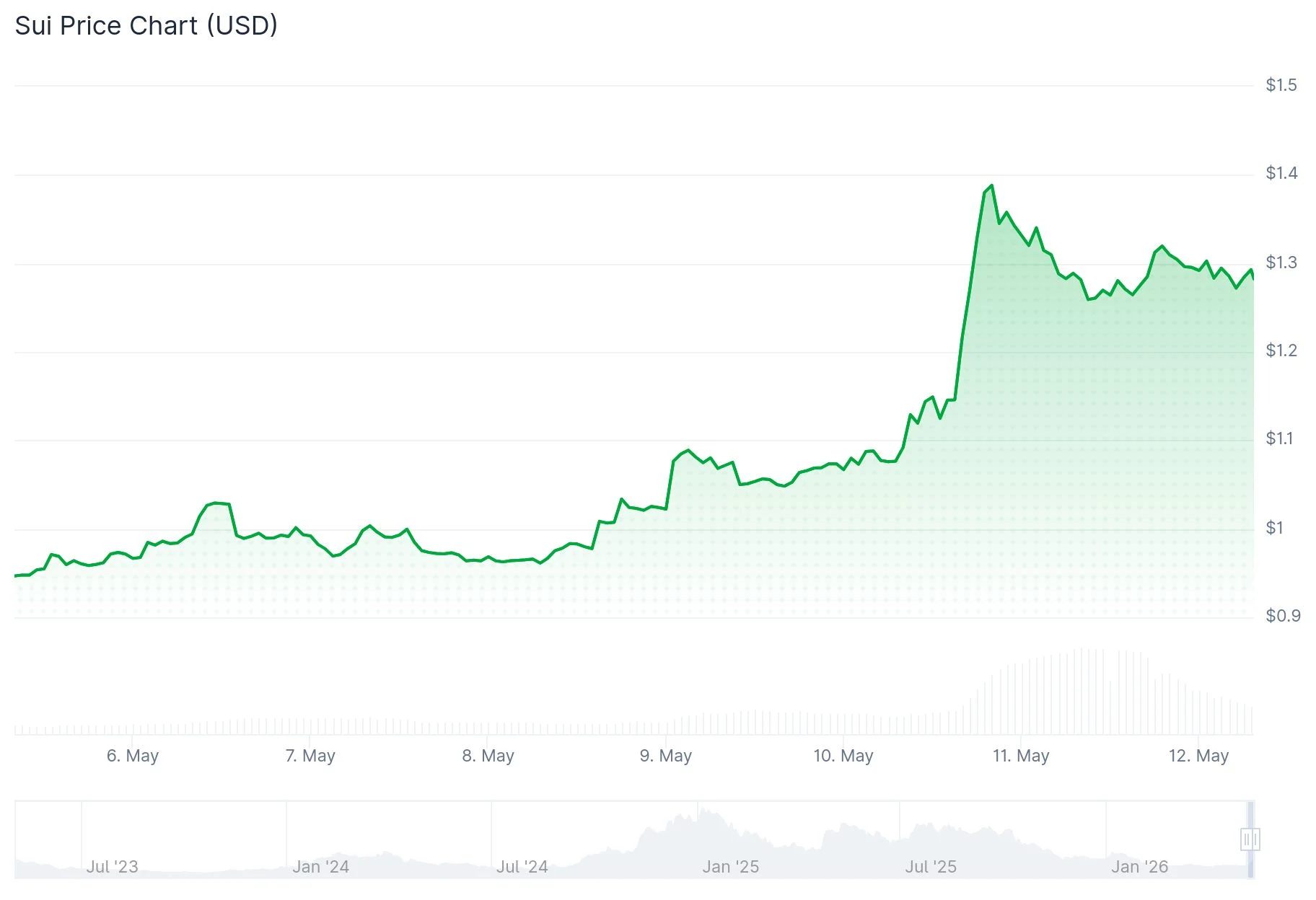
On-chain analytics platform Santiment highlighted the price surge, connecting market behavior to significant institutional staking activity. SUI Group Holdings executed a major treasury reallocation on May 10, moving its complete holding of 108.7 million SUI tokens away from decentralized finance protocols and directly into staking positions.
This strategic reallocation pulled roughly 2.7% of SUI’s circulating supply out of accessible trading pools. The network already maintained approximately 74% of total tokens in staking positions before this recent transfer, meaning the additional commitment further restricted available market liquidity.
Santiment emphasized that this rally displays characteristics distinct from conventional retail-driven price movements. The firm identified growing institutional participation rather than social media hype as the primary momentum factor.
CME Derivatives Product and Institutional Interest
A major catalyst on the horizon involves CME Group’s SUI futures product, set to begin trading May 29. CME confirmed that both Avalanche and SUI futures became accessible for trading on May 6, with initial block trades executed between FalconX and G-20 Group.
Institutional market participants commonly interpret CME listings as validation of an asset’s maturity and market readiness. The futures offering should enhance overall liquidity while providing sophisticated traders with regulated infrastructure for exposure management and risk hedging.
Seasoned trader Peter Brandt amplified the bullish narrative by publishing SUI price analysis on X. He identified $0.95 as a critical bottom formation and projected movement toward “substantially higher” price levels from current valuations. Brandt’s technical analysis showcased a clear breakout pattern, drawing significant attention from traders seeking directional guidance.
Price Structure and Strategic Partnerships
From a technical analysis perspective, SUI emerged from a three-month consolidation phase that restricted price below $1.05 throughout April and early May. The $1.05 threshold has now converted into a support zone.
Immediate support currently rests near $1.20, while resistance appears around $1.35. A confirmed daily close above $1.35 would bring the next objective near $1.50 into technical range. CoinGlass metrics displayed open interest surpassing $708 million, with 24-hour futures volume exceeding $2.5 billion.
A strategic collaboration with Paga Group, a Nigerian financial technology company that facilitated over $11 billion in payment processing and 169 million transactions during 2025, provided additional upward momentum. Paga announced plans to integrate Sui Dollar (USDsui) while adopting Sui as its core blockchain infrastructure across both enterprise systems and consumer-facing applications.
Open interest experienced a modest 2.5% decline on May 11, dropping below $1 billion, pointing toward partial profit realization among traders following the sharp price appreciation.
