


TLDR
- The XRP Ledger processed 2.7 million daily payments, marking a 12-month high, while XRP price declined 26% year-to-date
- Automated market maker pools expanded to nearly 27,000 as tokenized real-world assets on XRPL grew 35% over 30 days to reach $461 million
- Current XRP trading price hovers around $1.42, representing a 62% drop from its late-2025 peak of $3.65
- Technical analysts monitor a critical support zone spanning $0.80–$0.95, while a confirmed breakout above $3.32 could trigger targets of $27–$48
- Total value locked on XRPL remains at $47.54 million, contrasting sharply with XRP’s $84 billion market capitalization
The XRP Ledger continues to register unprecedented activity levels, yet the token price tells a different story. XRP currently changes hands around $1.42, reflecting a 26% year-to-date decline and sitting 62% beneath its late-2025 apex of $3.65.

Successful daily payments on the XRP Ledger climbed to a 12-month peak exceeding 2.7 million transactions. This represents a significant jump from approximately 1 million in late 2025, with the network maintaining throughput between 20 and 26 transactions per second.
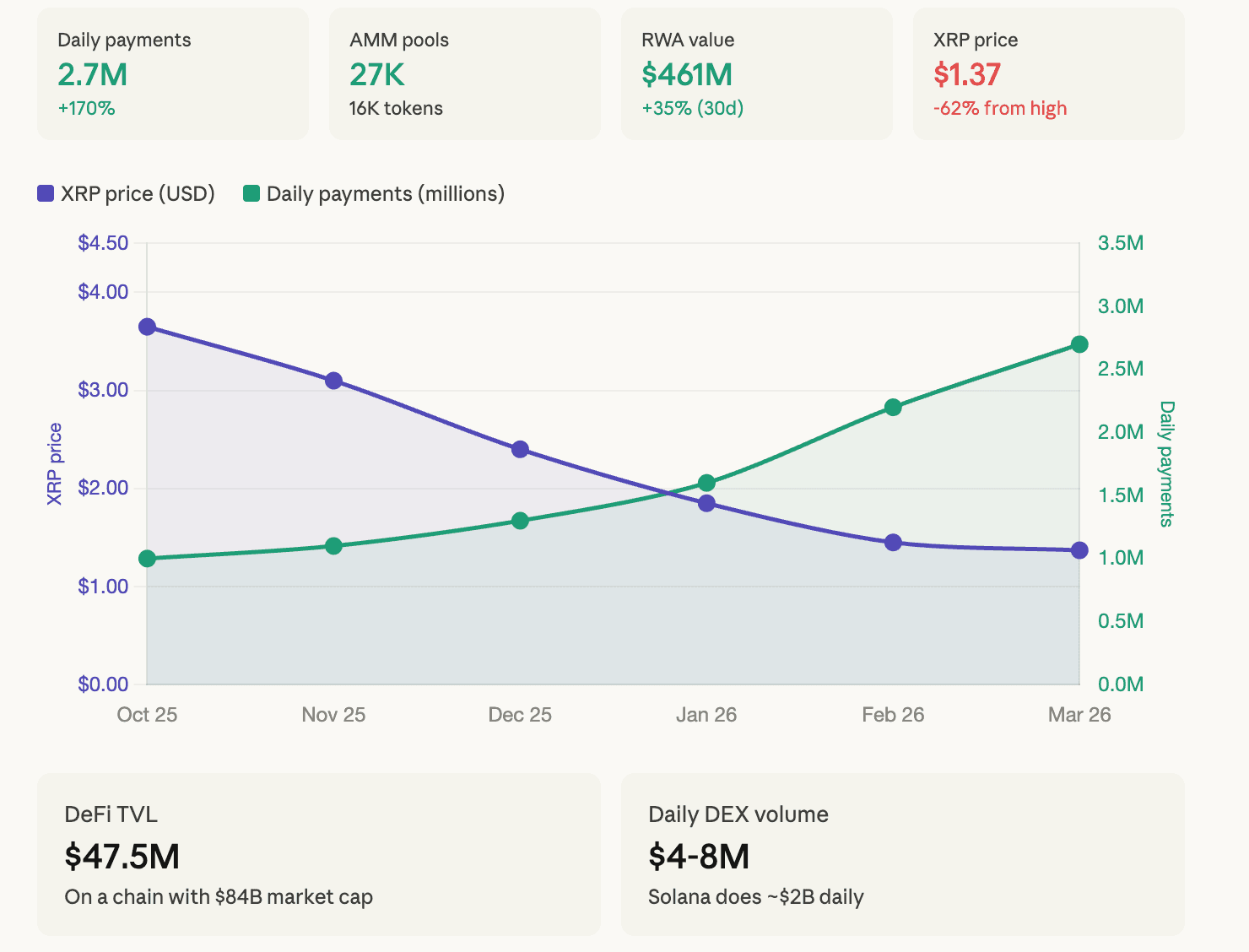
The automated market maker ecosystem has expanded to nearly 27,000 pools, facilitating trading for more than 16,000 distinct tokens. These pools collectively hold twelve million XRP in liquidity.
Tokenized real-world assets deployed on the ledger reached $461 million, marking a 35% expansion over the preceding 30 days. During this same timeframe, stablecoin transfers totaled $1.19 billion, while the aggregate stablecoin market cap on XRPL stands at $339 million distributed among 35,800 holders.
A substantial portion of this network activity connects to Ripple’s RLUSD stablecoin and tokenized assets that utilize XRP momentarily as a bridge currency. These operations generate temporary rather than permanent demand for the token.
Understanding the Disconnect Between Activity and Price
Cross-border payment flows that employ XRP for several seconds as a bridge between fiat currencies fail to produce persistent buying pressure. Network throughput increases, yet the token serves primarily as a liquid, transient medium.
Total value locked on XRPL measures just $47.54 million, according to DeFiLlama data. For comparison, Solana maintains approximately $4 billion in TVL, while Ethereum secures over $40 billion.

Decentralized exchange volume on XRPL ranges between $4 million and $8 million daily. This figure appears modest for any Layer 1 blockchain, particularly one commanding an $84 billion market capitalization.
The 30-day RWA transfer volume of $149 million — representing growth exceeding 1,300% — does signal genuine institutional engagement in the tokenization sector.
Critical Levels Identified by Market Analysts
Analyst EGRAG CRYPTO highlights a crucial bottoming zone spanning $0.80 to $0.95, where multiple technical indicators align, including 21, 50, and 100 EMA compression alongside a long-term ascending trendline.
Should XRP recapture the 21 EMA and escape its current corrective pattern, the subsequent price objective would reach $2.20. The base-building phase may extend into Q2–Q3 2026.
Analyst Ali Martinez observes a long-term ascending triangle formation with horizontal resistance positioned near $3.32. A decisive breakout above this threshold projects macro objectives ranging from $27 to $48.
Analyst Crypto Patel recognizes a confirmed multi-year triangle breakout, establishing a projected bull-cycle target approaching $50.
The $1.27–$1.30 support region has withstood multiple tests successfully. Historical patterns show XRP typically delivers an 18% gain during March.
