



Key Highlights
- Q1 2026 revenue reached €847 million, representing an 80% year-over-year increase at constant currency
- Quarterly performance marks first complete period including Intelsat operations after July 2025 merger
- Japan Airlines committed to equipping over 40 long-haul aircraft with SES connectivity solutions
- Boeing partnership achieved key progress toward factory line-fit connectivity across entire aircraft portfolio
- Company maintains 2026 outlook with stable revenue and EBITDA projections on comparable basis
Luxembourg’s satellite communications leader SES released its first-quarter 2026 financial performance on Tuesday, revealing revenue of €847 million. The figure represents an 80% increase compared to the prior year at constant exchange rates.
The quarterly results represent the first complete reporting period incorporating Intelsat operations following the acquisition completed in July 2025. The merger has significantly expanded the company’s revenue base.
Adjusted EBITDA for the three-month period reached €404 million, climbing 44.2% at reported exchange rates. The adjusted EBITDA margin registered at 47.7%, compared with 55.1% during the corresponding quarter of the previous year, attributed to expanded operational costs from the enlarged enterprise.
When examined on a comparable basis that excludes Intelsat contributions, revenue advanced 3.1% while adjusted EBITDA improved 5% at constant exchange rates. These metrics demonstrate consistent organic expansion across core operations.
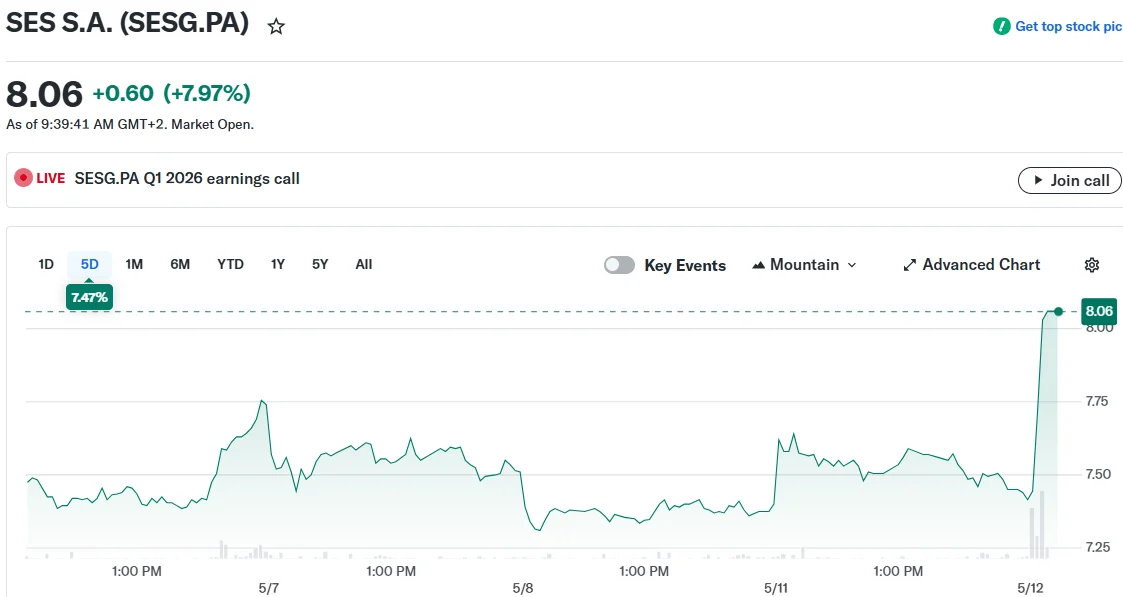
SES equity shares climbed more than 6% during Tuesday’s trading session, reaching the highest point recorded in 2026. The stock settled near €8.17 at market close.
Aviation Division Delivers Exceptional Performance
The aviation vertical emerged as a leading performer during the quarter. Chief Executive Officer Adel Al-Saleh disclosed that approximately 600 aircraft currently operate with the SES multi-orbit inflight connectivity platform.
The company finalized agreements during the period to equip more than 40 long-haul aircraft for Japan Airlines with connectivity services. Total new business and contract renewals across all segments reached €306 million.
SES achieved a significant development with Boeing advancing toward factory line-fit deployment of the multi-orbit connectivity platform across Boeing’s complete aircraft model range. This approach enables the technology to be integrated during manufacturing rather than through retrofit installations.
European Infrastructure Partnerships Reinforced
Regarding European operations, SES partnered with the EU Agency for the Space Programme to extend the EGNOS GEO-1 satellite service contract through 2030. This service delivers high-precision navigation capabilities for aviation and additional sectors throughout Europe.
The company maintained its involvement in the IRIS² programme, a European Commission project focused on sovereign space-based connectivity infrastructure. Anticipated capital expenditure for 2026 stands at approximately €700 million, encompassing investments in IRIS² and the initial deployment phase of the meoSphere programme.
Networks revenue, representing 66% of consolidated revenue, totaled €556 million. Mobility revenue within this division achieved €259 million, advancing 207.8% at constant exchange rates, incorporating a planned contract restructuring in the Aviation segment valued at €81 million.
Media revenue generated €285 million, increasing 42.9% at constant exchange rates, while declining 11% on a comparable basis.
Net profit registered as a €16 million loss, contrasting with a €29 million profit recorded in the year-ago period. Elevated depreciation expenses of €108 million and expanded financing costs following the Intelsat transaction impacted the bottom line.
Adjusted net debt to EBITDA measured 4.1 times, rising from 1.2 times one year prior, reflecting leverage associated with the acquisition financing.
Personnel costs decreased 20% while total operating expenditure declined 9% year-over-year at constant currency on a comparable basis, indicating initial progress on integration and cost optimization efforts.
SES confirmed its full-year 2026 financial guidance, projecting stable revenue and adjusted EBITDA year-over-year on a comparable basis at constant exchange rates.
