



TLDR
- PI token rallied 16%, climbing to a three-month peak above $0.23
- V20.2 protocol deployment finished successfully on March 7, requiring all nodes to complete updates by March 12
- Proof-of-concept demonstrated Pi Nodes can facilitate decentralized AI training through unused computing resources
- Price faces critical resistance at $0.28, a level where previous rallies encountered selling pressure in Q4 2025
- March 14 Pi Day may feature major updates including validator reward details and possible Kraken exchange listing
Pi Network’s native token has delivered consecutive double-digit percentage increases, climbing to price levels last seen approximately three months ago. This upward momentum coincided with two significant technical and ecosystem milestones.
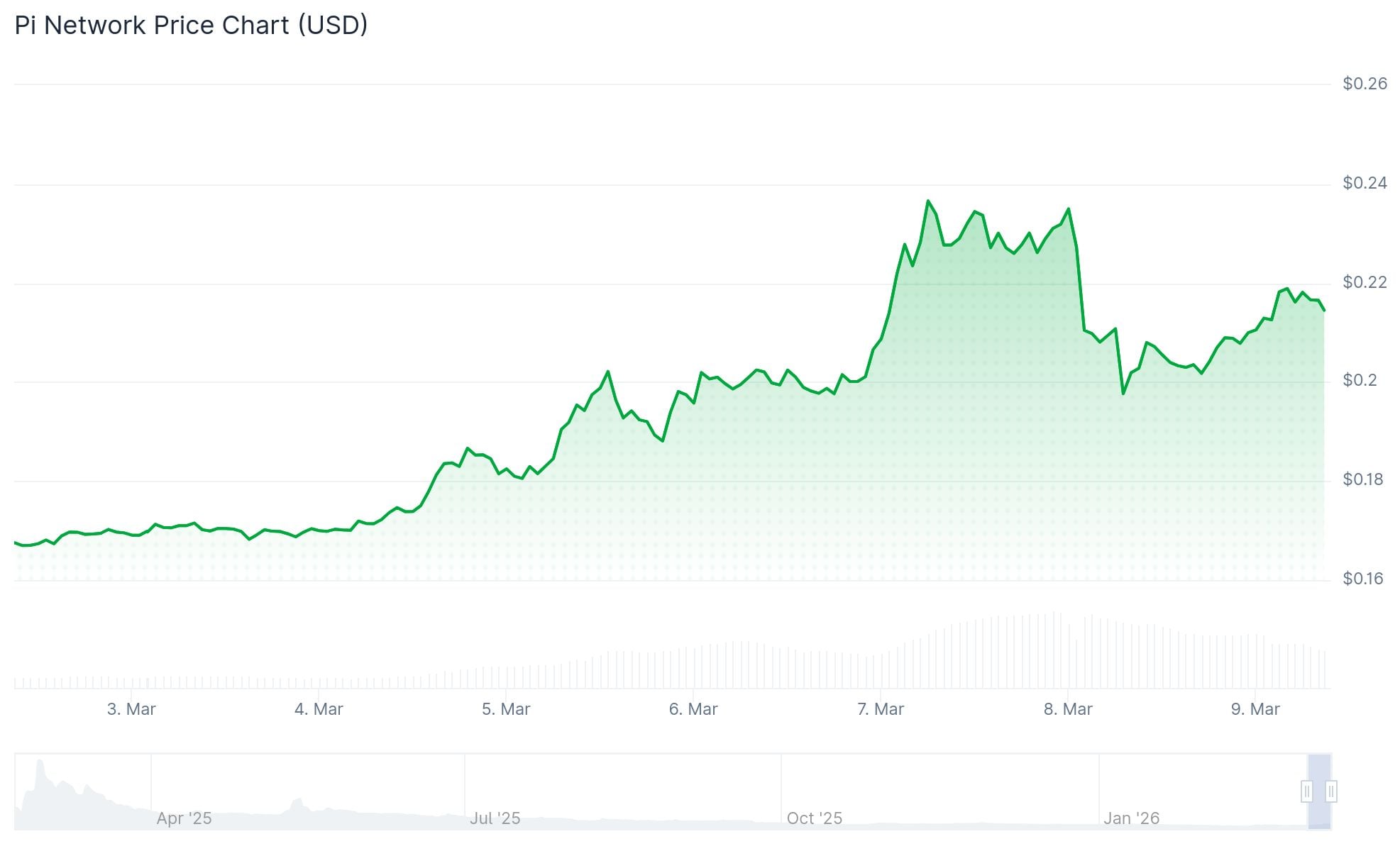
March 7 marked the successful deployment of the V20.2 protocol enhancement. This upgrade requires participation from all mainnet node operators, who face a March 12 deadline for implementation. Pi Network operates through more than 421,000 active nodes globally. While brief service disruptions occurred during the rollout phase, the network has since achieved full synchronization.
This deployment represents the third milestone in Pi Network’s roadmap toward version 23 of the Stellar consensus protocol, with final completion targeted for March 12, two days ahead of the annual Pi Day celebration on March 14.
AI Computing Case Study
Pi Network’s development team released a case study during the past week that examines an innovative application for its existing node infrastructure. The research evaluated whether Pi Nodes could effectively support decentralized artificial intelligence training and computational workloads through idle processing capacity.
The experiment involved collaboration with seven volunteer node operators alongside OpenMind, a robotics company supported by Pi Network Ventures. Findings confirmed that computational tasks were successfully distributed to participating nodes, with accurate results transmitted back to external clients.
With 421,000 operational nodes representing over one million CPUs collectively, the team highlighted this dormant computational power as a resource available to external organizations requiring large-scale processing capabilities. Node operators would earn cryptocurrency payments for successfully completing assigned computational tasks.
Pi Network’s ecosystem includes tens of millions of identity-verified users through KYC processes, creating potential opportunities for human-assisted AI model training applications.
Key Price Levels to Watch
Analyzing price action, PI Coin successfully breached a descending resistance trendline near $0.23 that had limited upside movement throughout February. The Supertrend technical indicator switched to bullish territory for the first time in several weeks, currently positioned at $0.1843.
Current price action trades above all four exponential moving averages. The 100-day EMA positioned at $0.1969 serves as immediate resistance, while the 200-day EMA at $0.2876 represents a higher technical barrier.
Market participants are focusing attention on the $0.28 price zone. During Q4 2025, PI experienced a strong rally from approximately $0.19 before encountering resistance at $0.28, which ultimately triggered a price reversal. Breaking decisively through this level would diminish concerns about history repeating itself.
Trading activity shows increasing volume, though CryptoQuant’s spot volume metrics indicate neutral conditions, meaning the rally has yet to enter speculative excess territory.
PI currently holds the 40th position by market capitalization on CoinGecko, commanding a valuation exceeding $2.2 billion. March 7 saw nearly 21 million tokens enter circulation through scheduled unlocks, with additional release events planned for upcoming dates.
