


Key Takeaways
- Spot gold declined 2% to $4,664 per ounce following Trump’s announcement of imminent aggressive action against Iran within two to three weeks
- The decline ended a four-day rally in gold futures
- Crude oil prices jumped to $108 per barrel, increasing inflation concerns and bolstering dollar strength
- UBS reduced its 2026 average gold price projection to $5,000 from $5,200 while maintaining the year-end estimate at $5,600
- Silver experienced a decline exceeding 4%, and new metals tariffs drove aluminum costs to levels approaching four-year peaks
Precious metals experienced a significant downturn on April 2 following President Donald Trump’s nationally televised announcement regarding intensified military action against Iran.
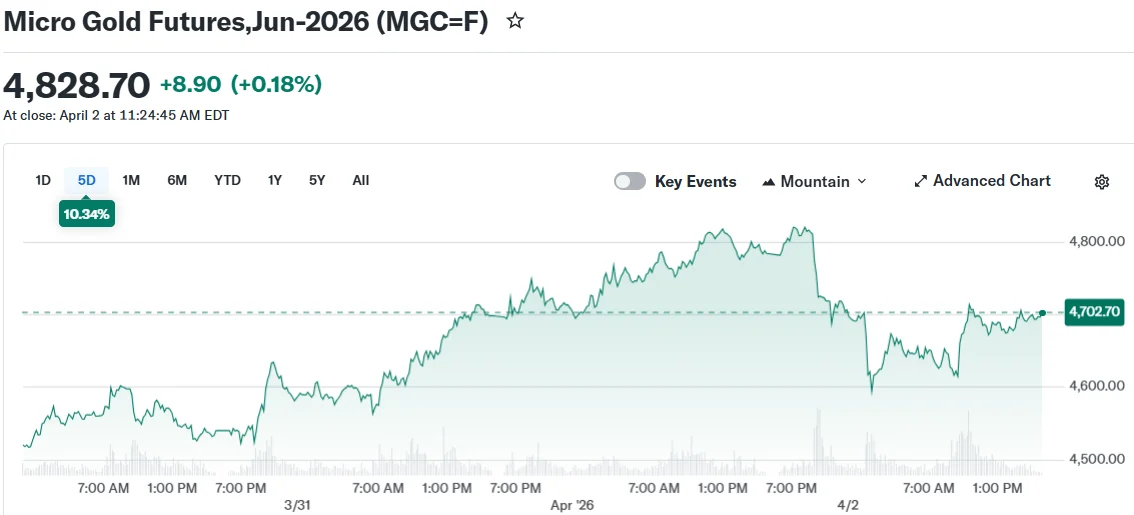
Spot gold registered a 2% decline to $4,664.39 per ounce, bringing an end to its four-day upward momentum. U.S. gold futures decreased 2.5% to settle at $4,691.10 per ounce.
The president announced plans to launch severe attacks on Iranian targets within a two-to-three-week timeframe. His statement included warnings about targeting electrical infrastructure and petroleum facilities should diplomatic negotiations fail.
“We’re going to bring them back to the stone ages, where they belong,” Trump declared during his April 1 White House address.
Investors had anticipated a more measured approach. Gold had been staging a comeback following its steepest monthly decline since October 2008 during March.
The president’s remarks immediately halted that rebound. Dow futures plummeted more than 260 points in the aftermath of Trump’s speech. S&P 500 futures decreased 0.7% while Nasdaq 100 futures dropped 0.8%.
Understanding Gold’s Counterintuitive Decline
The precious metal’s response caught many market participants off guard. Traditional market behavior sees gold rallying during periods of elevated geopolitical risk as investors seek protection. This situation has defied conventional wisdom.
Trump’s statements triggered a substantial rally in energy markets. Brent crude advanced 7.1% to reach $108.29 per barrel. West Texas Intermediate climbed from approximately $97 to surpass $113 within a matter of hours.
Rising oil prices amplify inflation concerns. This dynamic drives Treasury yields and dollar valuations upward. Gold, which generates no income, becomes less attractive to investors when the greenback gains strength.
Iran’s Foreign Ministry issued a response the following day. “We are absolutely determined and resolute to continue our defense against this aggression,” a spokesperson declared.
Silver tumbled 4.6% to $71.67 per ounce. Platinum retreated 2.5% to $1,914.61, while palladium declined 1.4% to $1,451.92.
UBS Revises Gold Price Projections
UBS lowered its average 2026 gold price projection to $5,000 from $5,200, reflecting first-quarter market developments.
UBS strategist Joni Teves indicated that upcoming weeks may witness “choppy price action” as investors continuously evaluate shifting geopolitical dynamics.
Teves maintained the firm’s year-end gold projection at $5,600.
Regarding industrial metals, Trump issued an executive order establishing a 50% tariff on products manufactured entirely from aluminum, steel, or copper. Derivative products primarily composed of these materials will face a 25% tariff rate.
Aluminum valuations recently climbed to levels approaching four-year highs driven by supply constraints linked to Middle East hostilities.
Benchmark copper on the London Metal Exchange concluded Thursday’s session 0.8% higher at $12,434.50 per ton.
