


TLDR
- Bitcoin climbed 2.5% to reach $67,884 on Tuesday while remaining below the $70,000 threshold amid ongoing U.S.-Iran geopolitical tensions
- U.S. stock futures declined following Monday’s recovery from significant intraday losses on Wall Street
- Defense sector and energy companies showed strength; Lockheed Martin and Palantir climbed alongside Nvidia’s roughly 3% gain
- Crude oil rallied on concerns that Strait of Hormuz disruptions could impact global supply chains and fuel inflation pressures
- Market participants await Friday’s nonfarm payrolls data and upcoming Federal Reserve commentary for monetary policy signals
Bitcoin posted gains on Tuesday, advancing 2.5% to settle at $67,884. Wall Street also pursued a modest recovery, though both markets maintained a cautious posture.
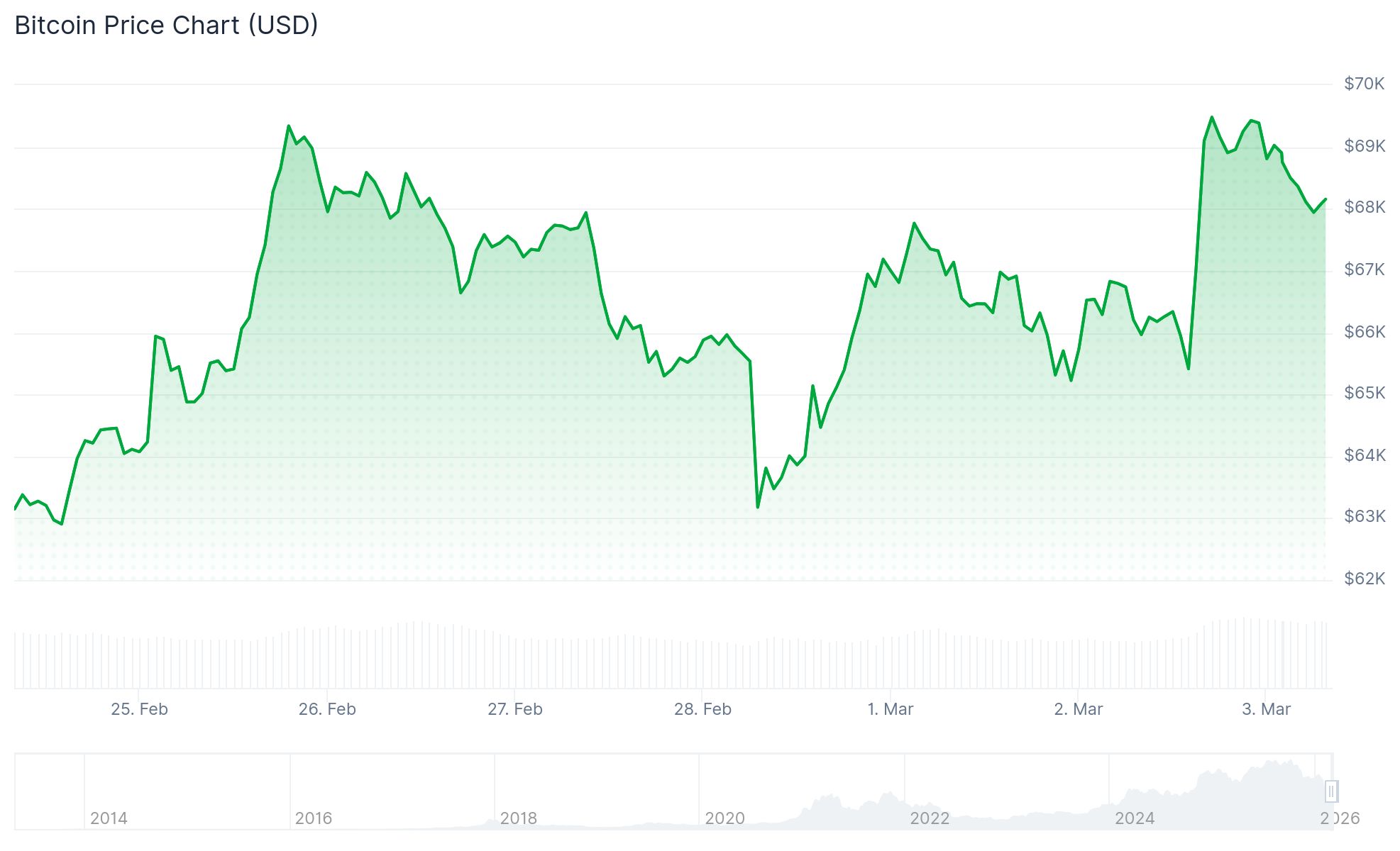
The digital asset market has experienced limited movement throughout February. Bitcoin has oscillated within a $60,000 to $70,000 corridor for several weeks and has declined 22% year-to-date in 2026.
Bitcoin reached an intraday peak of $69,213 during Monday’s trading session before retreating. The cryptocurrency has struggled to maintain levels above $70,000 since the final days of January.
Market sentiment across asset classes has been influenced by escalating Middle East hostilities. Joint U.S.-Israel military operations resulted in the death of Iran’s Supreme Leader, Ayatollah Ali Khamenei, during the opening phase of the conflict.
President Trump indicated the military engagement could extend four to five weeks, while acknowledging the possibility of a prolonged timeline. Leadership in all three nations demonstrated continued commitment to their positions as of Tuesday.
Energy and Defense Sectors Respond to Supply Concerns
Oil prices surged following reports indicating the closure of the Strait of Hormuz. Warnings directed at vessels attempting passage through the critical waterway sparked concerns about potential global supply chain disruptions.
Energy companies and defense contractors posted strong gains during Monday’s session. Lockheed Martin and Palantir both advanced, while Nvidia climbed approximately 3%.
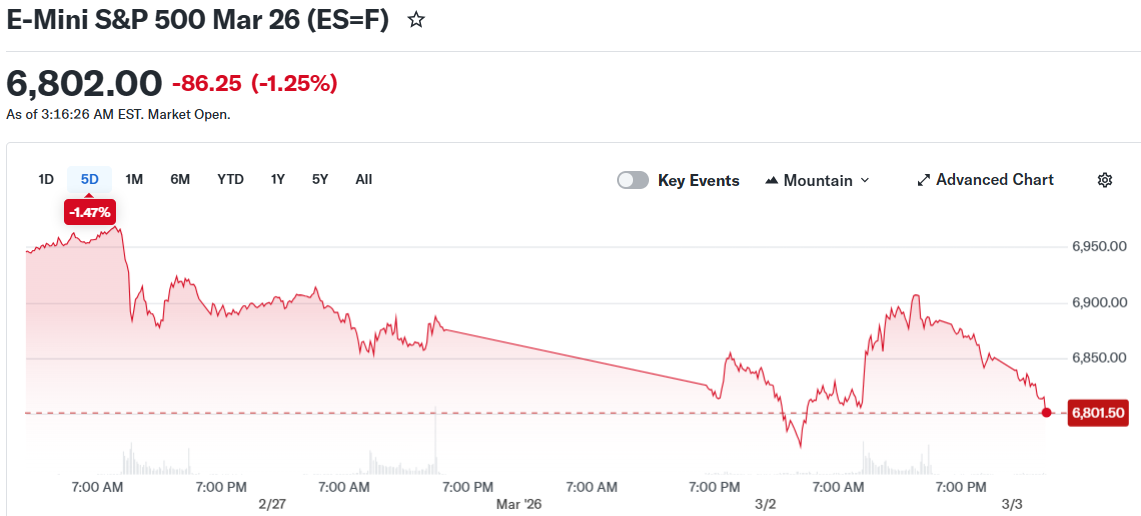
Overnight trading showed weakness in U.S. stock futures. S&P 500 futures declined 0.2%, Nasdaq 100 futures retreated 0.3%, and Dow futures fell approximately 0.2%.
The overnight futures weakness contrasted with Monday’s close, when major indexes finished in positive territory. Both the S&P 500 and Nasdaq Composite ended the session higher.
Buying activity emerged during Monday’s trading hours as investors capitalized on lower prices. The Dow Jones Industrial Average erased most of its morning decline by the closing bell.
Digital Assets and Upcoming Economic Indicators
Wider cryptocurrency markets posted advances on Tuesday while remaining below Monday’s intraday highs. Ethereum climbed 2.6% to $1,993. XRP increased 0.9%, Solana advanced 2.9%, and BNB gained 2.5%.
Dogecoin declined 0.6%, while $TRUMP appreciated 1.5%. Cardano dropped 1.1%.
Strategy’s recent corporate Bitcoin acquisitions generated limited market impact. Bitcoin has fallen over 40% from the record peaks established in October 2025.
Market participants are focused on Friday’s February nonfarm payrolls release. This employment data will influence Federal Reserve interest rate expectations.
Multiple Fed officials have scheduled appearances before Friday’s report. Interest rate projections carry significant weight for crypto valuations due to their relationship with market liquidity.
Retail sector earnings will also command attention during the current week. Target reports on Tuesday, with Costco’s results due later in the week.
