


Key Highlights
- Samsung SDI secured its inaugural long-term battery supply contract with Mercedes-Benz
- High-nickel NCM technology will power upcoming compact and midsize electric SUVs and coupes
- Deal value projected to surpass 10 trillion won (approximately $6.8 billion) with supply volumes reaching tens of GWh
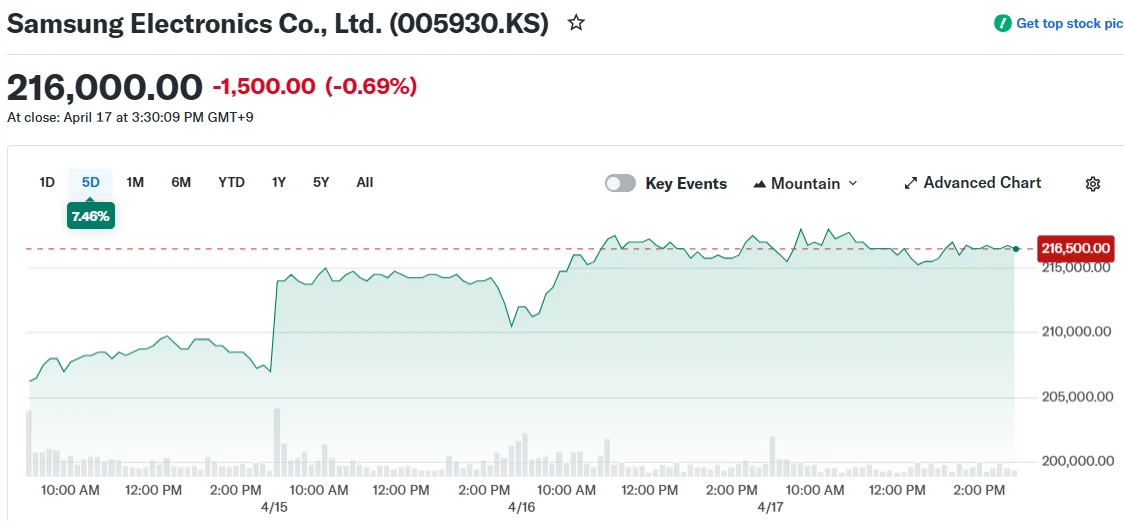
- Samsung SDI shares climbed 4.87% following the announcement; Mercedes-Benz shares declined 2.49%
- Mercedes-Benz joins Samsung SDI’s expanding European portfolio that features BMW and Volkswagen
Samsung SDI finalized its inaugural battery supply partnership with Mercedes-Benz during a Monday ceremony in Seoul, propelling the company’s shares upward by 4.87%. Senior leadership from both organizations attended the formal signing event.
The battery cells will feature high-nickel nickel-cobalt-manganese (NCM) technology. According to Samsung SDI, this chemistry provides superior energy density, extended driving range, enhanced longevity, and robust power performance.
Mercedes-Benz intends to integrate these batteries into forthcoming compact and midsize electric SUV and coupe platforms. Industry insiders indicate the batteries are designated for an EV model scheduled to debut in 2028.
Samsung SDI chose to withhold official financial details of the agreement. Industry analysts estimate supply volumes will reach tens of gigawatt-hours, with the overall contract value anticipated to exceed 10 trillion won — approximately $6.8 billion.
The Seoul ceremony featured Samsung SDI President and CEO Choi Joo-sun alongside Mercedes-Benz Group Chair Ola Kallenius and Chief Technology Officer Jorg Burzer.
Years of Relationship Building Led to Partnership
The collaboration emerged from sustained diplomatic efforts. Samsung Electronics Chair Lee Jae-yong had been cultivating closer connections with Mercedes-Benz over an extended period.
During a November visit to South Korea last year, Kallenius met with Lee at Samsung’s exclusive guest facility in Seoul. Their discussions explored opportunities spanning automotive electronics and energy storage solutions.
The partnership gained traction when Lee traveled to Germany alongside Samsung SDI President Choi for direct negotiations with Mercedes-Benz executives.
Previous business connections between the companies provided fertile ground for the agreement. Harman, a Samsung subsidiary, currently delivers infotainment systems and premium audio solutions to the German automaker.
For Mercedes-Benz, this partnership strengthens a supplier network that already incorporates Korean battery manufacturers LG Energy Solution and SK On. The automaker has pursued strategic supplier diversification in preparation for its upcoming electric vehicle generation.
Strategic Implications for Samsung SDI
The contract expands Samsung SDI’s European customer portfolio, which currently serves BMW and Volkswagen.
Samsung SDI emphasized that the batteries will incorporate exclusive safety technologies, positioning this as a competitive advantage in securing the partnership.
The companies outlined plans to extend their collaboration beyond this supply agreement, encompassing joint research into advanced battery technologies and innovative mobility platforms.
“This partnership brings together the innovative DNA of both companies,” a Samsung SDI official said.
Mercedes-Benz described the deal as ensuring “a stable supply of high-performance battery technology, a critical component of the brand’s electrification strategy.”
The substantial order volume is projected to strengthen Samsung SDI’s revenue performance and optimize manufacturing capacity utilization. The multi-year agreement will support production for Mercedes-Benz’s 2028 electric vehicle portfolio.
