



Key Takeaways
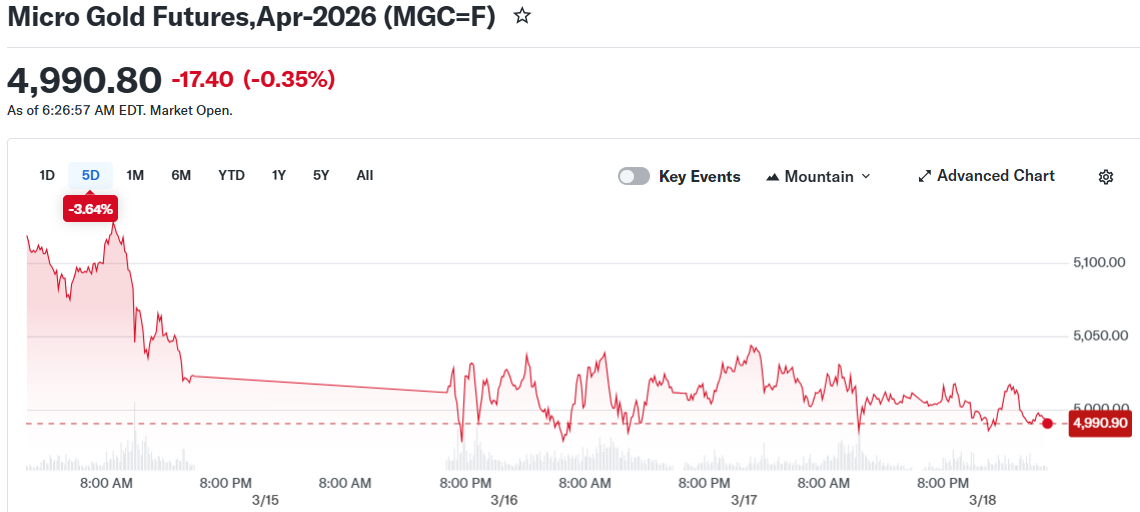
- Gold maintains trading levels near $5,000 per ounce, showing an 18% gain year-to-date following a four-week low of $4,967 reached on March 16
- The Federal Reserve appears set to maintain current rates at 3.50–3.75% in today’s announcement, with market indicators showing a 99.2% probability of unchanged policy
- Gold reached $5,423 on February 28 following U.S. and Israeli military operations against Iran, though the rally reversed within days as dollar strength and rate expectations shifted
- Iran has executed missile and drone strikes targeting UAE, Saudi Arabia, and Kuwait; maritime traffic through the Strait of Hormuz continues to face severe disruption
- Major financial institutions including J.P. Morgan and Deutsche Bank project year-end 2026 gold prices at $6,300 and $6,000 respectively
Gold continues to trade near the $5,000 per ounce threshold as market participants await the Federal Reserve’s policy announcement and subsequent press briefing scheduled for today. Traders indicate the meeting’s forward guidance will carry more weight than the rate decision itself.
The Federal Reserve appears likely to maintain its current rate range of 3.50–3.75%. CME FedWatch data indicates a 99.2% probability of unchanged rates. Market focus centers on Fed Chair Jerome Powell’s commentary regarding inflation trends, employment conditions, and the trajectory for future policy adjustments.
Gold reached a peak of $5,423 on February 28 following coordinated U.S. and Israeli military strikes on Iranian facilities. The price surge persisted for approximately three days before retreating. Spot gold declined to $4,967 by March 16, marking a four-week low.
Two primary factors have applied downward pressure on gold following that peak. The U.S. dollar gained strength as market participants moved toward safe-haven positions, increasing gold’s cost for international buyers using alternative currencies. Additionally, elevated oil prices — with Brent crude maintaining levels above $100 per barrel — amplified inflation projections, diminishing expectations for imminent rate reductions.
Middle East Developments Impact Market Dynamics
Ongoing regional conflict continues to strain energy markets. Iraq finalized an agreement to restart oil exports through Turkey, providing some relief to supply concerns and contributing to oil’s decline on Wednesday. Maritime transport through the Strait of Hormuz faces ongoing disruption.
Iran acknowledged the death of national security chief Ali Larijani after overnight military operations. Tehran subsequently initiated additional missile and drone strikes directed at the UAE, Saudi Arabia, and Kuwait.
The energy supply constraints have elevated inflation projections during a period when the Fed’s preferred metric, core PCE, already registered 3.1% in January. March and April CPI figures — which would reveal the extent of oil price transmission — remain unpublished.
Federal Reserve Signals Could Determine Gold’s Direction
Current market pricing reflects expectations for a single rate cut in 2026, anticipated in December. Earlier projections at year’s start included multiple reductions.
The Fed’s dot plot, scheduled for release at 2:00 p.m. ET today, will display policymakers’ rate projections. A median dot showing zero or one cut would represent tighter policy expectations and potentially pressure gold prices. Two or more projected cuts would provide support.
Powell’s press conference begins at 2:30 p.m. ET. This represents his penultimate briefing before his term concludes in May.
Gold’s technical analysis reveals the $4,996 support level has maintained on a closing basis since mid-March. The RSI indicator registers approximately 47, indicating neutral momentum. The subsequent resistance level stands at $5,053.
Central banks have accumulated approximately 1,000 tons of gold annually beginning in 2022. J.P. Morgan forecasts a year-end 2026 price target of $6,300. Deutsche Bank projects $6,000.
Spot gold traded at $5,012.29 during early Wednesday afternoon in Singapore. Silver advanced 0.6% to $79.75. The next significant data release following today’s Fed decision arrives with the March CPI report on April 10.
